

HOW GRID ARBITRAGE WORKS
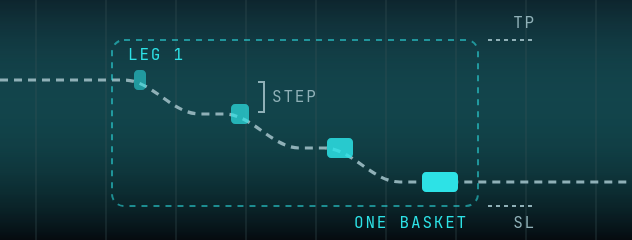
Opens the first leg when the fast feed leads your broker's price by at least your Trigger Gap and, with the Trend Filter on, only with the trend. If price then moves a further Grid Step against the last leg, it adds another leg in the same direction, each the previous size times Lot Mult, as long as the trend filter still allows that side and the fast feed doesn't disagree. With the Trend Filter on, no leg opens while price is further from the EMA than the filter's safe zone. The whole basket is managed together with a shared TP, SL and trailing stop.
WHAT'S NEW IN 2.0.9
- Pause Entries: a new button under START/STOP. While it is on, the tab opens no new trades (Grid: no further levels) and open trades keep all their exits. START/STOP reads "STOP (PAUSED)"; press "Resume Entries" to trade again.
- Grid Arbitrage: at START, the log points out a Basket SL that sits below the current spread (advice only).
- Several tabs on one broker login now send their orders one at a time; a new entry that would wait more than 5 seconds is not sent, and the log says so.
WHAT'S NEW IN 2.0.8
- Close Trade now lights up as soon as a leg is open, so you can end a running Grid from Horizon (Close Trade, then STOP).
- Trend Filter: Band and Dwell now work with a single EMA, so a price that hugs the EMA no longer opens a basket on every touch.
- STOP and Close Trade are safer. An order already on its way when you press STOP or Close Trade is no longer sent afterwards. After Close Trade the tab waits the full 5 seconds before it trades again.
- Session P&L now also counts Grid Arbitrage tabs, per tab, from your broker's own close answers (gross, before commission and swap).
- Grid warns in red when the broker doesn't confirm a close.
WHAT'S NEW IN 2.0.7
- A broker-side safety stop, if you set a Disaster SL (MT4/MT5 brokers only; shown as DISASTER STOP in the 2.0.7 log). Also on 2 Leg Lock.
- Basket TP, Basket SL, the trailing stop and Max DD % now run on every price tick.
- Trigger Gap 0 now turns the gap test off for the first trade. Set your Trigger Gap before START.
- Trend Filter: the EMA period, its price source and the candle length are now settings, with an optional second EMA.
GRID PARAMETERS
| SETTING | WHAT IT DOES |
|---|---|
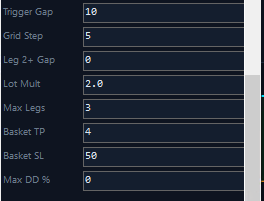
Trigger Gap | How far the fast feed must lead your broker to open the first leg. 0 turns this test off for the first trade; set it before START |
Grid Step | Distance in points from the last leg's entry before the next leg is added |
Lot Mult | Size multiplier for each new leg: the previous leg's size times this factor, rounded up to two decimals |
Max Legs | Maximum number of open positions allowed in one grid basket |
Basket TP | Profit target for the entire basket combined. Closes all positions when reached |
Basket SL | Stop loss as a fixed price level measured from the first entry. Closes all if hit |
Max DD % | The loss on your whole account (balance minus equity) as a % of balance. Closes the basket if exceeded. 0 turns it off |
Trail Start | Profit level at which the trailing stop activates on the entire basket |
Trail Dist | How far behind the highest profit point the trailing stop follows the basket |
Several tabs on one broker login send their orders one at a time, so a basket close can wait one broker round trip behind another tab. Grid's broker disaster stop sits two grid steps past the Basket SL; on a fast move it can close a leg first, and the tab then halts entries until you press STOP and START. That is the backstop working, not a fault. If it recurs, widen the Basket SL or the grid step, or give the Grid tab its own login.
Legs are added against the price move, each the previous size times Lot Mult. Grid can place a broker-side safety stop if you set a Disaster SL (MT4/MT5 brokers only; shown as DISASTER STOP in the 2.0.7 log). If Disaster SL is 0 and Basket SL, Max DD % and Hard SL are all off, nothing stops a losing basket (Basket TP and the trailing stop can still close it in profit). Basket TP, Basket SL, the trailing stop and Max DD % only work while the strategy is started; after Stop, only Hard SL acts, and a Hard SL hit closes the whole basket. The Basket SL is a fixed price level from the first entry, not a floating P&L value.
Key Features
Trend filter
With the Trend Filter on, a leg only opens on the side the EMA trend allows, and none while price is further from the EMA than the safe zone.
Growing legs
With Lot Mult above 1, each new leg is larger than the last, so the risk grows with every leg the basket adds.
Basket Risk Management
Unified TP, SL, and trailing stop across all positions in the grid.
Ready to Trade Grid Arbitrage?
Join our Telegram community to get access to Horizon HFT and start running the Grid Arbitrage strategy on your prop firm or live account.
Join Telegram