

Order Book Imbalance
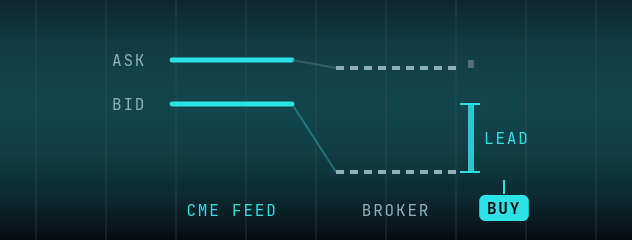
Trades on the CME Futures feed: when it leads your broker's price on one side by at least your Imbalance setting, while the other side stays below your Counter setting, it enters that way.
STRATEGY: ORDER BOOK IMBALANCE (OBI)
Compares the CME Futures feed with your broker's price for the same instrument. When the feed leads on one side by at least your Imbalance setting, while the other side of the price stays below your Counter setting, it enters that way. It trades on prices only; it does not read order-book volume. One trade at a time, with the same exits as 1 Leg.
| SETTING | WHAT IT DOES |
|---|---|
Imbalance | How far the feed's bid must be above the broker's bid for a buy (the broker's ask above the feed's ask for a sell). A price gap, not a volume |
Counter | The limit for the other side of the price, which must stay below it, so the lead is on one side only |
WHAT'S NEW IN 2.0.9
- Order Book Imbalance with Shift or Auto Offset now enters on the shifted value, the same value the chart shows. Check your Imbalance gap against the chart before your first session.
- Order Book Imbalance: the log says when the fast feed sends no order book depth.
OBI needs the CME Futures feed (Chicago), listed in the client as "Horizon CME". The client won't start it on any other feed.
How Order Book Imbalance Works
OBI compares the CME Futures feed with your broker's price. It trades on prices only: it does not read order-book volume.
The Imbalancesetting is how far the feed must lead your broker on one side: the feed's bid above the broker's bid for a buy, or the broker's ask above the feed's ask for a sell. Higher values mean fewer, more selective entries.
The Countersetting is the limit for the other side of the price: for a buy, the broker's ask minus the feed's ask must stay below Counter, so entries only happen when the lead is on one side.
What you need
The CME Futures feed (Chicago) and an account on MetaTrader 5, MetaTrader 4, Rithmic or BloFin. The client won't start OBI on any other feed.
To set up the CME Futures feed, email support@horizonhft.com.
Price comparison
Watches the CME Futures feed against your broker's price.
One-sided lead
Counter limits entries to moves where the feed leads on one side only.
Direction
Enters on the side where the feed leads.
Ready to Trade OBI?
Join our Telegram community to get access to Horizon HFT and the CME Futures feed.
Join Telegram