

2 LEG LOCK
Locked-pair entry
STRATEGY: 2 LEG LOCK — LOCKED-PAIR ENTRY
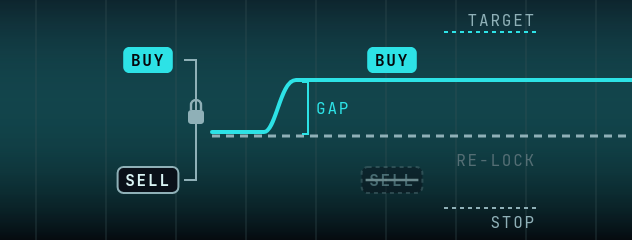
Opens a BUY and a SELL together on one account. When the fast reference feed leads your broker's price by at least your Exec Gap, it closes the leg on the wrong side. The other leg stays open with two orders at your broker on the opposite side, one at its target price and one at its stop price. When either fills, it opens the opposite position, so the pair is locked again rather than closed. Then it waits for the next lead.
| SETTING | WHAT IT DOES |
|---|---|
Exec Gap | How far the fast price must lead before the wrong-side leg is closed |
Take Profit / Stop Loss | Distance from the release price at which broker orders re-lock the remaining leg. Nothing is closed there |
Lock Side | Which leg may be kept after a release: Buy Only keeps a BUY, Sell Only keeps a SELL, Both allows either |
Max Spread | No new pair and no release while the broker spread is wider |
Min Time | No release until the pair is at least this old |
Trade Pause | Wait before a new pair after a cycle, and after a re-lock. A short built-in pause applies when it is 0 |
Shift / Auto Offset | Part of how the lead is measured, as in 1 Leg: corrects a constant difference between the two prices |
Lot Size / Risk % | The size of each leg; both legs get the same size |
Trail Start / Trail Dist, Hard SL, Max Time | Used only if your broker rejects the lock orders. A hit re-locks the remaining leg; it does not close it |
2 Leg Lock needs a hedging account (MT4, or MT5 in hedging mode). It is not available on Rithmic or BloFin. The client does not detect netting or FIFO accounts, so check your account type with your broker first. Nothing closes a locked pair automatically: while both legs are open there is no time limit, no stop, no Hard SL and no trailing stop. Pressing Stop leaves the positions open. The pair stays open until the fast feed leads by your Exec Gap (which closes one leg) or you close it with Close Trade.
The one exception, from 2.0.7: if you set a Disaster SL above 0, the client places a broker-side safety stop (MT4/MT5 brokers only; shown as DISASTER STOP in the 2.0.7 log). With Disaster SL at 0, everything above holds.
WHAT'S NEW IN 2.0.8
- STOP and Close Trade are safer. An order already on its way when you press STOP or Close Trade is no longer sent afterwards. A 2 Leg Lock pair is never left with one leg. After Close Trade the tab waits the full 5 seconds before it trades again.
- 2 Leg Lock warns in red when the broker doesn't confirm a close.
Key Features
Locked-pair mechanism
Holds a BUY+SELL pair. When the fast feed picks a side it closes the wrong leg, and broker orders lock the other again at its target or stop.
What closes it
Only a lead of your Exec Gap (which closes one leg), or you with Close Trade. There is no automatic close, no Hard SL and no trailing stop on a locked pair, and Stop leaves it open.
Understanding the 2 Leg Lock Strategy
2 Leg Lock runs on one broker account. It opens a BUY and a SELL together on that account:
- Leg 1: BUY on your broker account
- Leg 2: SELL on the same account
When the fast reference feed leads your broker's price by at least your Exec Gap, it closes the leg on the wrong side. Broker orders then lock the other leg again at its target or stop price; nothing is closed automatically.
Lock Side sets which leg may be kept after a release: Buy Only keeps a BUY, Sell Only keeps a SELL, Both allows either.
Key Components:
- Fast reference price feed
- One broker account in hedging mode
Ready to Trade 2 Leg Lock?
Join our Telegram community to get access to Horizon HFT and start running 2 Leg Lock on your prop firm or live account.
Join Telegram